Invoice check
Catch overcharges before you pay them.
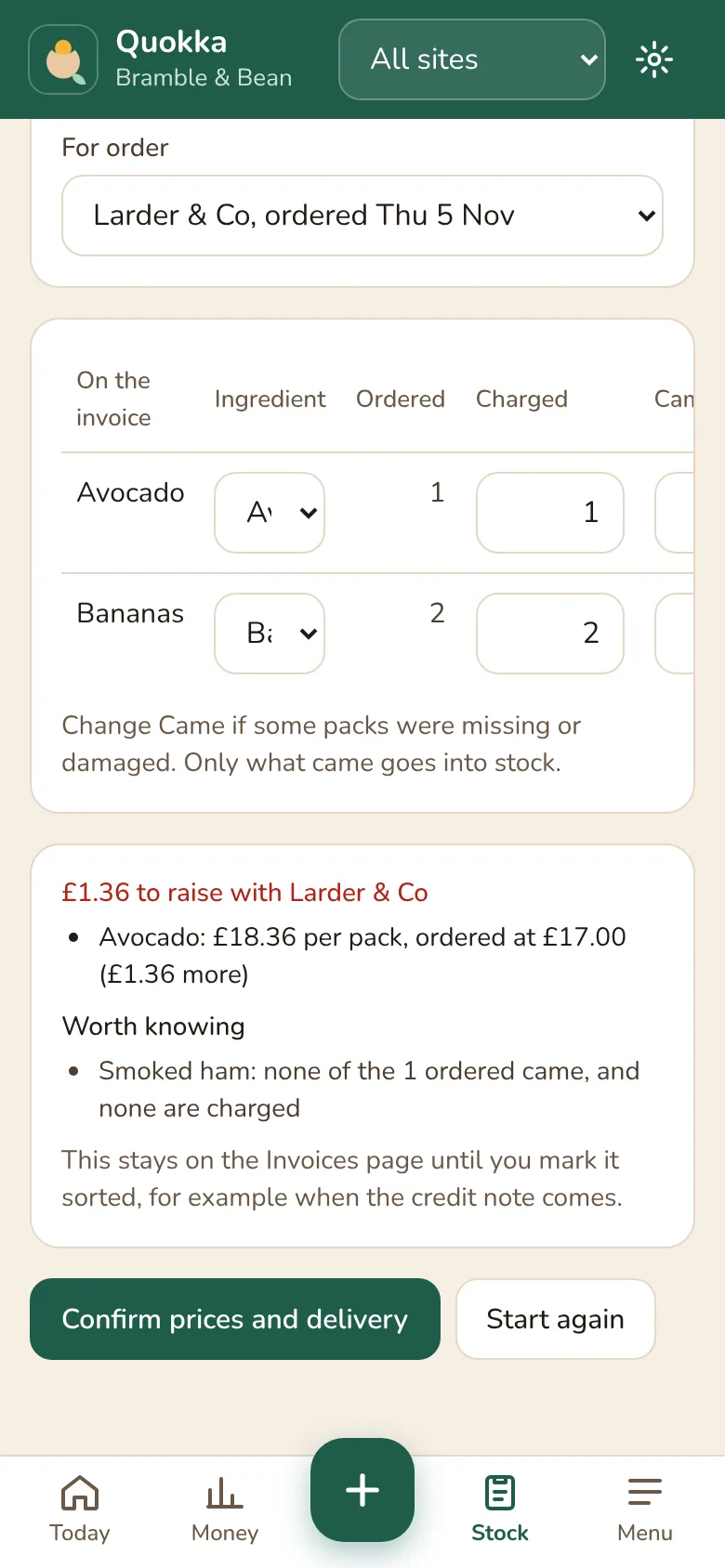
Snap the delivery note or upload the supplier's PDF. Quokka reads the lines and checks them against your order: packs charged that didn't come, prices above what you ordered at, and anything missing.
How it works
Photo or PDF
Take a photo of a paper invoice, or upload the PDF your supplier emails.
Checked against your order
Mark an order as ordered and its invoice is matched to it, line by line.
What to raise, in pounds
Short deliveries and price differences are added up into one figure to take to the supplier.
Kept until it's sorted
Each one stays on the Invoices page until you mark it sorted, for example when the credit note comes.
Prices and stock in one go
Confirm it and new prices reach your recipes, and what came goes into stock.
Who gets it right
Each supplier's page shows how often their deliveries come right and what they've overcharged.
Questions
- What if the invoice is read wrong?
- You check every line before anything is saved, and can change any of them.
- Do I have to send orders through Quokka?
- No. Without an order, prices and stock still update. To check an invoice against an order, mark the order as ordered first.
Working out your margins by hand? Try the free GP calculator or read our guides for cafe owners.
Be one of the first cafes to try it.
30 days free, no card needed. Then £39 per site per month, ex VAT, or £29 locked for 2 years if you're one of the first 20 cafes.